Glamorous Toolkit as a case study
Glamorous Toolkit itself is an extensive case study of Moldable Development.
For example, in the current image, there are thousands of extensions to the environment. These extensions vary from inspector extensions for different objects to search specifications. They can be small, like an Inspector extension. Or they can be more elaborate, like a Lepiter snippet. They all contextualize the environment in some form.
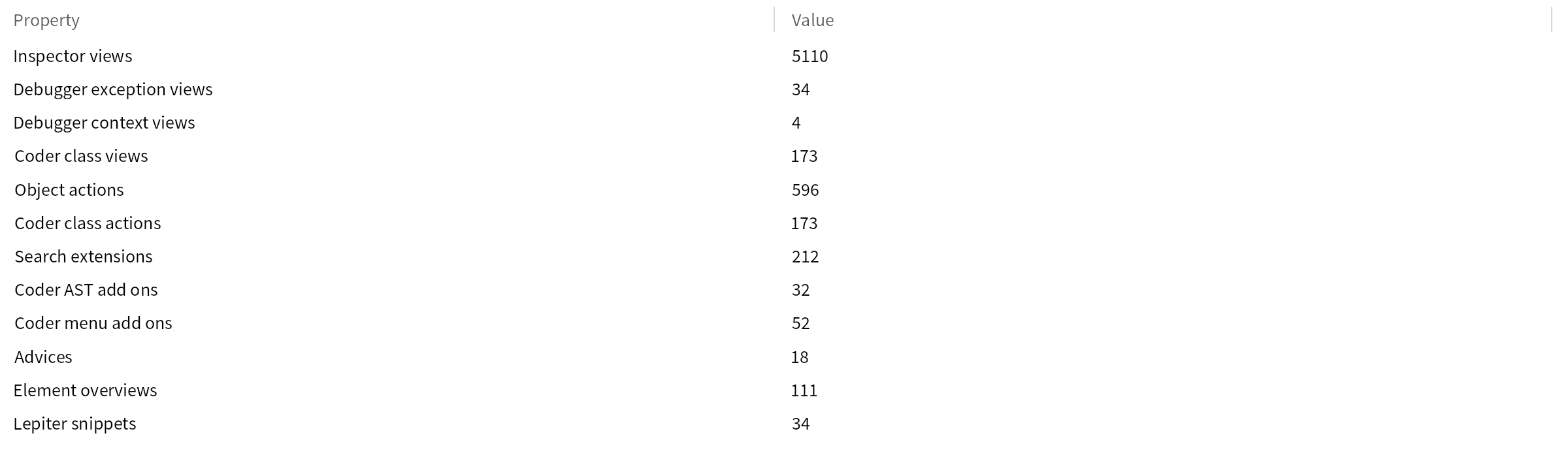
These extensions were created during development and were born out of engineering needs. The specific extensions can be interesting, but even more interesting is the process through which we created them.
It should also be said that these are only the extensions that ended up being reusable. For example, we often create views over objects that we only use once and do not reuse beyond that. This is possible because these views can be constructed inexpensively in our environment. Because it is so cheap to experiment with them, we do not have to ask whether it is meaningful to create a tool. We create it by default, and this changes how we experience the system.
Here are several examples illustrating how GT contextualizes its own environment:
• GT Inspector views for files provides several examples of reusable, contextual views for files • Quantifying the need for contextual tools presents an interactive Treemap of the packages within GT, highlighting which classes implement contextual views or examples. • Explaining the squarified treemap algorithm illustrates how contextual views can be used to explain a Treemap visualization algorithm. • Explaining the text editor's selection mechanism shows how a dedicated visualization helps to explain (and debug) the text selection mechanism in the GT text editor. • Scripting an elaborate user interface scenario shows how elaborate user interface scenarios can be scripted within GT with the help of dedicated views. • Optimizing the links in the book for first time readers shows how a dedicated visualization can be iteratively created to analyze and optimize the reachability of GT Book pages for new readers. • Testing user interactions: the Spotter case study shows how user interactions can be exemplified and tested with the help of scripted scenarios. • Detecting the correct positioning of a dropdown shows an example of a dedicated contextual tool being created to debug a persistent issue with dropdown menus being incorrectly displayed. • Explaining the context menu and dropdown algorithm illustrates how context menus and the dropdown menu can be made explainable with the help of contextual tools. • Identifying an editor bug by inspecting wrapped Rust objects provides another example of an issue being debugged with the help of dedicated views.